
How to register
- Open the verified SCR111 address and select Register.
- Enter your full legal name as it appears on the bank account.
- Add the Australian mobile number.
- Create a password of 6-20 characters.
- Enter an optional referrer code if applicable.
- Request and enter the SMS verification code, then submit.
Registration starts from the Register button on the homepage or login screen. Complete each field directly rather than allowing another person to create the account. The account holder should control the mobile number, password and bank details from the beginning.
The full-name requirement is highlighted in yellow beneath the first field. Using the legal bank-account name helps keep the profile consistent when deposits, withdrawals or verification checks are performed later.
Registration form
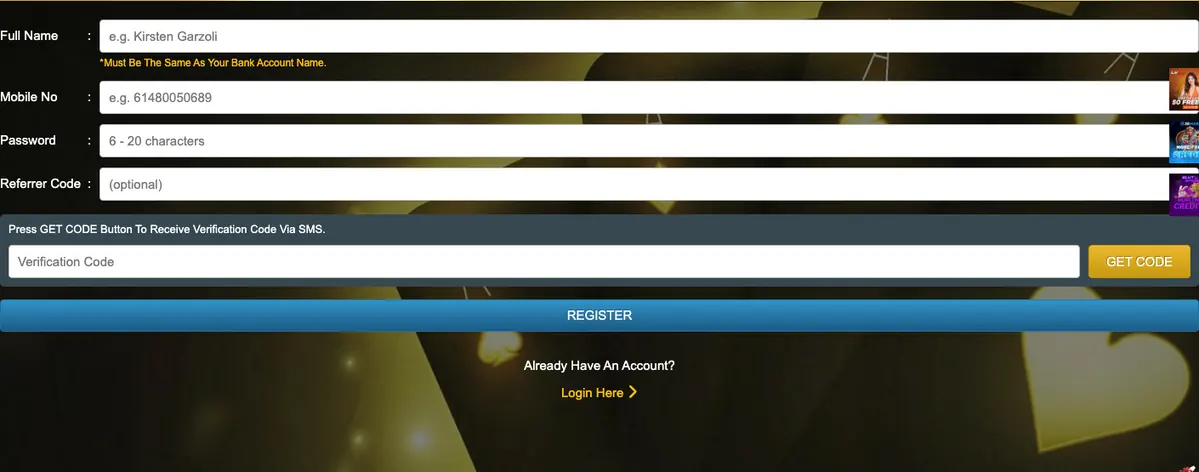
After entering the mobile number, use Get Code to request the SMS verification value. Delivery may take a short time depending on the network. Avoid requesting many codes in rapid succession, because only the newest value may remain valid.
The registration screenshot shows that the referrer field is optional. Do not enter an unknown code unless it is connected to the intended promotion or invitation.
Information requested
| Full name | Must match the bank account name according to the form. |
|---|---|
| Mobile number | Used for the account and SMS verification. |
| Password | The form displays a 6-20 character requirement. |
| Referrer code | Marked optional. |
| Verification code | Requested through the Get Code button. |
The password should contain 6-20 characters according to the form prompt. Length alone is not enough for good security, so use a unique combination that is not based on the mobile number, name or a common sequence.
Store the password securely and keep access to the registered telephone number. These details are important for normal login, account recovery and possible verification messages.
Before creating an account
Confirm that online gambling is permitted for you, that you meet the age requirement and that you understand the current payment and bonus terms. Use unique credentials and do not share the SMS code.
Before pressing Register, review the name, mobile number and optional code. Correcting an error after account creation may require support and additional verification. Do not create multiple profiles simply because the first form contained a mistake.
After registration, read the cashier limits and promotion conditions before depositing. The public screen showed AUD 10 minimum deposit and AUD 50 minimum withdrawal, but method-specific details can appear only inside the account.
SCR111 mobile verification
The Get Code button requests a verification value for the mobile number entered in the form. Make sure the number is correct before requesting it. If several codes arrive, use the newest one and do not share it with another person.
Failure to receive the message may be caused by network delay, number format or repeated requests. Wait briefly before contacting support.
Creating a secure password
SCR111 displays a 6-20 character range. Use a password that is unique to the casino account and difficult to guess. Names, birthdays, common sequences and the registered mobile number are weak choices.
A trusted password manager can store the value. Do not send it through chat or save it in an unprotected note.
Referrer codes and promotions
The referrer-code field is marked optional. A code can be connected to an invitation or campaign, but it should not be entered unless its source and effect are understood. Registration can be completed without filling that field.
After account creation, open the Promo page and read the current eligibility conditions before claiming a new-member reward.
What to do after registration
Confirm that account details are correct, review the payment methods and check the live AUD limits. The public interface showed a minimum deposit of AUD 10 and minimum withdrawal of AUD 50, but individual methods can add other conditions.
Set a deposit budget before opening a game and keep the transaction history available for later reference.
Frequently asked questions
What do I need to register at SCR111?
The form requests a full name, mobile number, password and SMS verification code; the referrer code is optional.
Why must the name match my bank account?
The registration screen explicitly requests the same name, which helps payment ownership checks.
Does SCR111 use SMS verification?
Yes. The registration form includes a Get Code control and verification-code field.